LDAP Based User Login
Like described in the Task we first need to make a Backup of our working Pam configuration
cd /etc
tar zcf /root/pam.tgz pam.conf pam.d
With the following Command we can check if everything worked just fine.
tar ztf /root/pam.tgzOutput
pam.conf
pam.d/
pam.d/common-auth
pam.d/common-password
pam.d/login
pam.d/runuser
pam.d/chfn
pam.d/chsh
pam.d/runuser-l
pam.d/sshd
pam.d/passwd
pam.d/other
pam.d/newusers
pam.d/su
pam.d/common-account
pam.d/common-session-noninteractive
pam.d/cron
pam.d/common-session
pam.d/chpasswd
pam.d/su-l
Now Install libpam-ldapd via apt-get install libpam-ldapd
And Configure the Server like shown in the following Pictures.
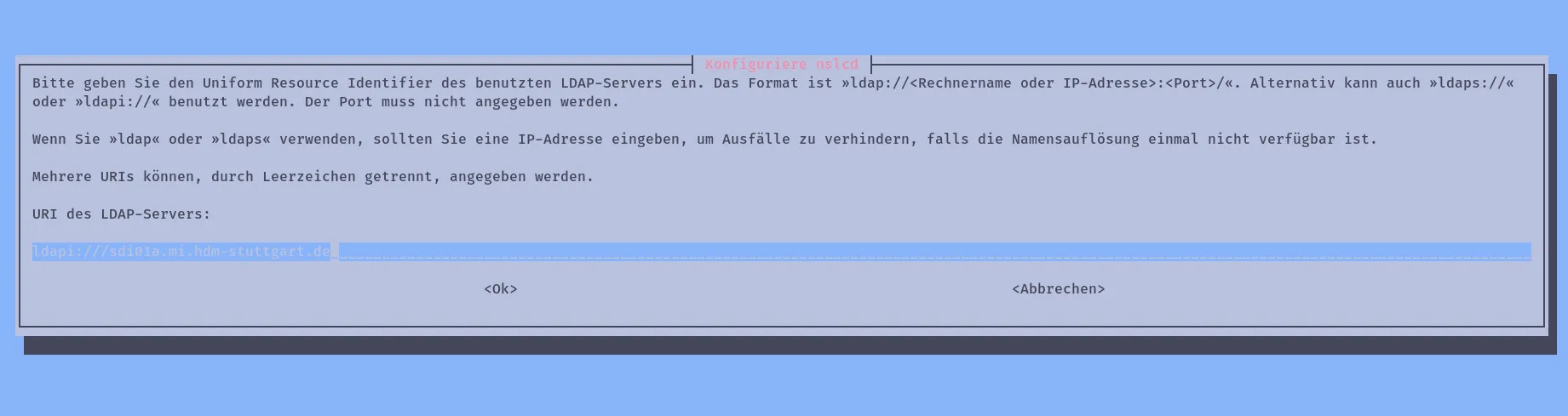

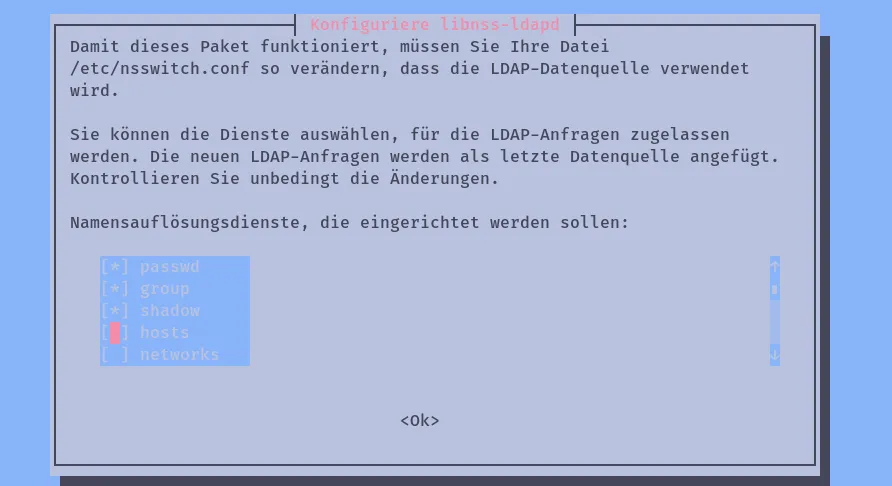
Then we need to reboot our Server to continue.
rebootTo test your LDAP Server you can test it with this command
id mehlOutput
uid=2000(mehl) gid=100(users) Gruppen=100(users)Now Edit the passwd, group and shadow in your /etc/nsswitch.conf so they look like this
# /etc/nsswitch.conf
#
# Example configuration of GNU Name Service Switch functionality.
# If you have the `glibc-doc-reference' and `info' packages installed, try:
# `info libc "Name Service Switch"' for information about this file.

passwd: files ldap
group: files ldap
shadow: files ldap
gshadow: files

hosts: files dns
networks: files

protocols: db files
services: db files
ethers: db files
rpc: db files

netgroup: nis
Set PasswordAuthentication to no in /etc/ssh/sshd_config
The Part of the File where PasswordAuthentication is defined should look like this
#IgnoreUserKnownHosts no
# Don't read the user's ~/.rhosts and ~/.shosts files
#IgnoreRhosts yes

# To disable tunneled clear text passwords, change to no here!
PasswordAuthentication no
#PermitEmptyPasswords no

# Change to yes to enable challenge-response passwords (beware issues with
# some PAM modules and threads)
ChallengeResponseAuthentication no

# Kerberos options
#KerberosAuthentication no
We then make sure the results are not influenced by caching, so we stop the nscd service
systemctl stop nscd
systemctl status nscd
Output
● nscd.service - Name Service Cache Daemon
     Loaded: loaded (/lib/systemd/system/nscd.service; enabled; vendor preset: enabled)
     Active: inactive (dead) since Tue 2023-08-01 11:27:24 CEST; 6s ago
    Process: 79 ExecStart=/usr/sbin/nscd (code=exited, status=0/SUCCESS)
    Process: 451 ExecStop=/usr/sbin/nscd --shutdown (code=exited, status=0/SUCCESS)
   Main PID: 86 (code=exited, status=0/SUCCESS)
        CPU: 29ms

Aug 01 11:15:00 sdi01a nscd[86]: 86 überwache das Verzeichnis »/etc« (2)
Aug 01 11:15:00 sdi01a nscd[86]: 86 überwache Datei »/etc/services« (6)
Aug 01 11:15:00 sdi01a nscd[86]: 86 überwache das Verzeichnis »/etc« (2)
Aug 01 11:15:00 sdi01a nscd[86]: 86 Die inotify-basierte Überwachung für die Datei »/etc/netgroup« deaktiviert: Datei oder Verzeichnis nicht gefunden
Aug 01 11:15:00 sdi01a nscd[86]: 86 »stat« für die Datei »/etc/netgroup« ist fehlgeschlagen; weiterer Versuch folgt später: Datei oder Verzeichnis nicht gefunden
Aug 01 11:15:00 sdi01a systemd[1]: Started Name Service Cache Daemon.
Aug 01 11:15:19 sdi01a nscd[86]: 86 Prüfe auf überwachte Datei »/etc/netgroup«: Datei oder Verzeichnis nicht gefunden
Aug 01 11:27:24 sdi01a systemd[1]: Stopping Name Service Cache Daemon...
Aug 01 11:27:24 sdi01a systemd[1]: nscd.service: Succeeded.
Aug 01 11:27:24 sdi01a systemd[1]: Stopped Name Service Cache Daemon.
Now we can create a new homedirectory for user with uid mehl by executing this command
mkhomedir_helper mehl